PECOS Account Setup: Access, Roles, and the First Application
Set up PECOS access correctly by separating identity, I&A permissions, organization relationships, preparer roles, signer authority, and the application’s actual submission state.
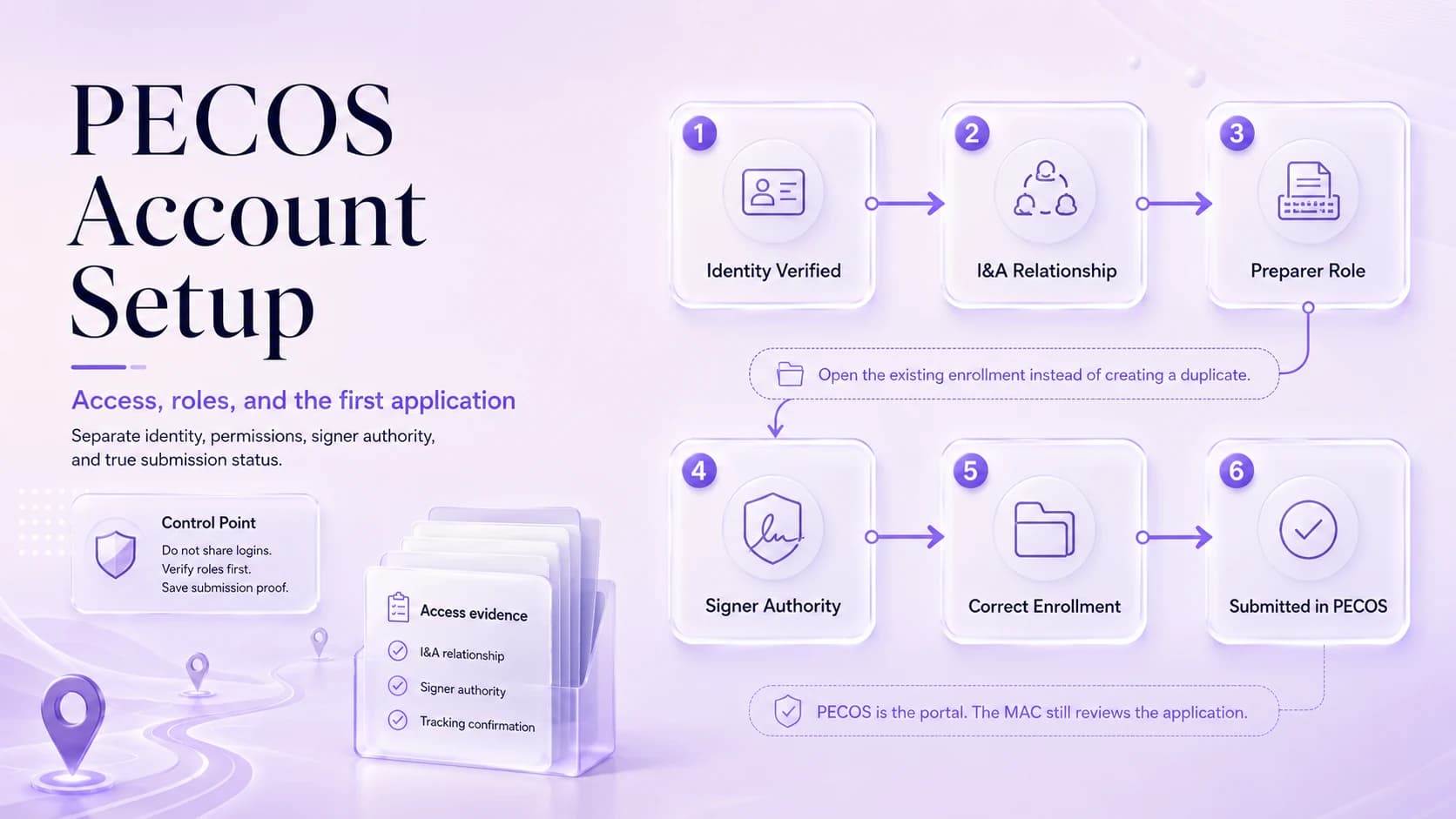
PECOS problems often begin before the enrollment application. A coordinator can know the clinician’s NPI and still be unable to see or act on the expected record because access depends on identity, organization relationships, and assigned roles. The fix is not credential sharing. Inventory who needs to prepare the application, who can legally certify it, which organization the filing belongs to, and whether the appropriate I&A/PECOS relationships are in place. Then open the correct existing enrollment or create the correct new transaction. PECOS is the online enrollment system, but the MAC still processes the Medicare application. A well-controlled account setup should let another authorized staff member understand the role chain without borrowing anyone’s login.
Map preparer, authorized official, delegated official, and clinician roles first
PECOS is CMS’s online enrollment management system for new enrollment, revalidation, updates, withdrawals, and electronic signatures.
A user’s ability to work an enrollment depends on identity and access permissions, not simply knowing the clinician’s NPI.
CMS recommends PECOS because it is paperless and applications tend to process faster than paper submissions.
Create an access matrix with each user, employer/organization, intended task, and authority level. Distinguish a staff member who enters data from an official who can legally sign or approve organization relationships. If an outside consultant prepares filings, document the permitted preparer role without giving the consultant an executive’s credentials. This access map should be reviewed when employees leave or responsibilities change. A shared username may feel faster during onboarding, but it destroys accountability and can make future access recovery harder when the original credential owner is unavailable.
Verify I&A relationships before diagnosing a missing PECOS record
Applications can be electronically signed, which reduces mailing steps when the correct signer has access.
The MAC remains the enrollment contractor even when the application is created in PECOS.
Access problems often masquerade as enrollment problems. Prove the user-role chain first, then troubleshoot the transaction.
When a user cannot see an expected enrollment, check the identity and organizational relationship first. Confirm the person is signing into the correct CMS identity, the NPI/entity is correctly associated, and the required role has been granted and accepted. A missing record can be an access problem rather than evidence that the provider is not enrolled. Save a short troubleshooting note that records what relationship was verified. This prevents a second coordinator from creating a new initial application simply because the first user lacked visibility into the existing one.
Open the correct enrollment instead of creating a duplicate transaction
Search for the current Medicare record before starting a new transaction. A clinician who has practiced elsewhere may already have an individual enrollment that needs a change, location update, or reassignment—not another initial application. Similarly, a group can have an existing enrollment under a legal name that differs from the current brand. Compare NPI, legal name, state/jurisdiction, and enrollment context. Duplicate filings can complicate status tracking and create extra contractor questions, so the decision to create a new enrollment should be explicit and documented.
Prepare from source documents while the signer path is tested in parallel
Building the application under the wrong organization relationship. This tends to surface later, when billing or scheduling discovers that a supposedly completed file still has an unresolved dependency.
Discovering at signature time that the authorized signer lacks the required access. A brief second-person check before submission is usually faster than answering a development request after the fact.
Sharing credentials instead of assigning proper access. When this happens, correct the source record first and then update the downstream copies that are actually affected.
Assuming an application is submitted when it is still saved, unsigned, or incomplete. Do not bury this under a generic “pending” label. Name the blocker, the owner, and the next action.
While access is being confirmed, assemble the source packet and route signer questions early. Verify legal name/TIN/NPI, licenses, ownership, locations, EFT, adverse-action disclosures, and other transaction data. Then test whether the intended signer can see and complete the appropriate action in PECOS. Do not wait until the final screen to discover the authorized official has no access or is on leave. Preparing data and resolving access can proceed in parallel as long as the team does not misrepresent a draft as submitted.
Confirm electronic signature and true submission before starting the status clock
Access-role list: Use a filename that includes the provider or entity, document type, and the date that matters.
Authorized/delegated official documentation: Store it with the transaction rather than in a personal downloads folder or one coordinator’s inbox.
Pecos screenshots or submission pdfs: Tie the document to the specific field or decision it supports.
Application tracking id: Record where it came from and when someone verified it.
Mac correspondence log: Preserve the prior version when an effective-date sequence could matter in a later review.
After the application is complete, confirm that the electronic signature was accepted and that PECOS shows the transaction as submitted rather than saved or awaiting action. Save the tracking information and submission confirmation. The internal status clock should begin at actual submission, not the date the preparer finished entering fields. If the MAC later asks for information, the team can show exactly when the application entered contractor processing and which signer completed it.
Store access governance and transaction evidence so the workflow survives turnover
Maintain an access-governance file separate from the enrollment content. Record official relationships, delegated access, periodic review date, and offboarding steps. Do not store passwords. Link the enrollment tracker to the transaction confirmation, not to one employee’s browser history. When staff turnover occurs, the practice should be able to remove old access, authorize a replacement, and continue monitoring open cases without opening duplicate applications. Good account setup is therefore part of enrollment continuity, not merely an IT prerequisite.
Operational checklist
- Inventory every person who needs to prepare, review, or sign the filing.
- Verify identity and organizational relationships before entering transaction data.
- Open the correct existing enrollment rather than creating a duplicate record.
- Complete sections in a source-document order so names, addresses, and identifiers remain consistent.
- Route the application to the proper signer and confirm the electronic signature was accepted.
- Save the tracking information and monitor both PECOS and MAC correspondence until disposition.
Frequently asked questions
Why can I see the NPI but not the Medicare enrollment in PECOS?
NPI knowledge does not grant PECOS access. Check the user’s identity, organization relationship, and assigned permissions before assuming the enrollment is missing.
Can a consultant prepare an application without being the signer?
A preparer can assist when the access and delegation structure permits it, but the person or official authorized to certify the application must complete the required signature/attestation. Do not solve the difference by sharing credentials.
How do I know the PECOS application was actually submitted?
Verify the transaction status after signature and save the PECOS submission/tracking confirmation. A saved draft or pending signature should not be counted as a submitted application.