Medicare Provider Enrollment: A Practical Roadmap for a New Practice
A practical Medicare provider-enrollment sequence for a new practice: identity and NPIs first, then PECOS, group and individual records, reassignments, MAC follow-up, and billing activation.
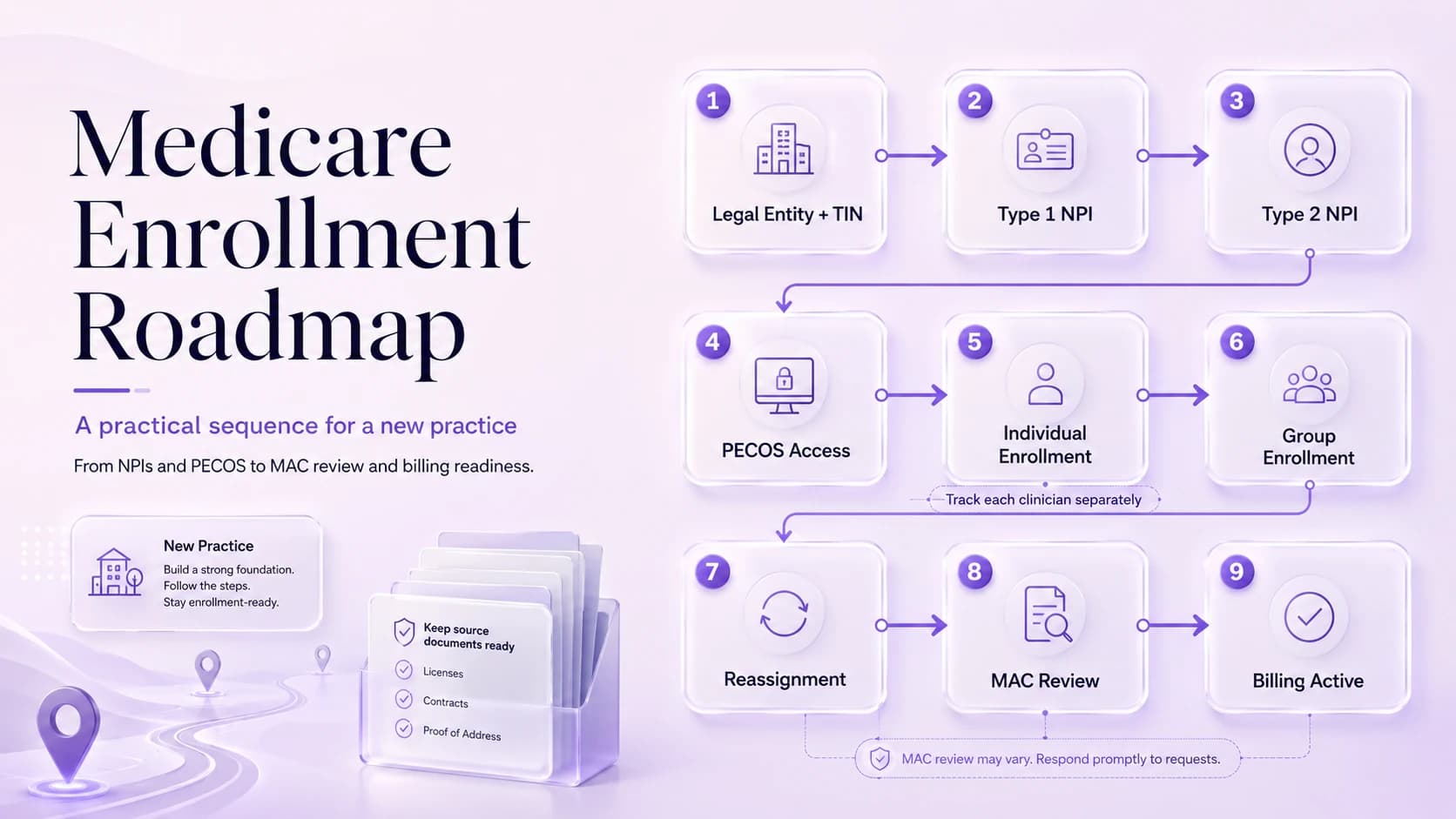
A new practice can own the right entity, have a bank account, and be ready to see patients while still being several Medicare steps away from a billable relationship. The sequence is easier when the team works from the payment structure outward. Identify the legal entity and TIN that will receive payment, the individual clinicians who will render services, the locations where services will be furnished, and the NPIs that identify each person and organization. Then use PECOS or the current Medicare applications to establish the appropriate individual and organization enrollments and the reassignments that connect them. The Medicare Administrative Contractor processes the filings and can request additional evidence. NPI issuance alone is not Medicare approval, and a group approval alone does not make every clinician billable through the group.
Draw the payment and provider map before opening PECOS
CMS places NPI acquisition before the Medicare enrollment application in its standard enrollment sequence.
PECOS is the online Medicare enrollment system; CMS also maintains paper enrollment applications for providers who cannot use PECOS.
The Medicare Administrative Contractor (MAC) processes the application for the applicable region and may request additional information.
Use a one-page diagram with legal entity, TIN, bank account, organization NPI, each clinician’s Type 1 NPI, service locations, and intended billing flow. Mark which entity will contract and receive Medicare payment. If the owner is also the only clinician, keep the person and organization in separate boxes anyway; that discipline becomes essential when the second clinician joins. The diagram should answer who renders, who bills, and where services occur. If those facts are unclear, an enrollment portal will not solve them—it will merely force the coordinator to guess inside individual fields.
Obtain or verify the Type 1 and Type 2 NPIs that match the real structure
Some provider and supplier types owe an enrollment application fee, while physicians, non-physician practitioners and physician/non-physician organizations generally do not.
Enrollment is not finished just because an NPI exists; CMS explicitly notes that NPI issuance does not establish licensure or credentialing.
The cleanest enrollment files are built from the payment entity outward: who gets paid, who renders care, where care occurs, and which identifiers tie those facts together.
CMS’s standard sequence places NPI acquisition before Medicare enrollment. Search NPPES first so a clinician does not obtain a duplicate Type 1 NPI merely because the practice is new. Review the individual record for legal name, taxonomy, and locations. For the organization, determine whether a Type 2 NPI is appropriate and align it with the exact legal business name and TIN. Keep a dated identifier sheet with source links. The sheet should make it obvious which number identifies the person and which identifies the organization; an NPI is not evidence of licensure, credentialing, payer network status, or Medicare billing privileges.
Choose the Medicare transactions the practice actually needs
Select transactions by relationship, not by habit. A new group may need a CMS-855B/PECOS organization enrollment. A physician or eligible non-physician practitioner may need an individual CMS-855I/PECOS enrollment or an update to an existing record. A clinician billing through the group may need reassignment. Ordering/certifying-only clinicians may have a different pathway such as 855O, and certain suppliers use other forms. Write the intended outcome next to each transaction before filing. That protects the practice from using a familiar form simply because a staff member used it at a prior employer.
Prepare source documents and signer access before submission day
Starting PECOS before the legal name, TIN, NPI, location, ownership, and banking records agree. The problem is not merely cosmetic: a mismatch can change which transaction is reviewed or where the request is routed.
Treating the individual clinician enrollment and the group enrollment as the same transaction. This tends to surface later, when billing or scheduling discovers that a supposedly completed file still has an unresolved dependency.
Opening the practice schedule before payer effective dates and reassignment relationships are understood. A brief second-person check before submission is usually faster than answering a development request after the fact.
Ignoring MAC development requests because the application was already submitted online. When this happens, correct the source record first and then update the downstream copies that are actually affected.
Prepare the source packet before the first data-entry session: formation/tax records, W-9, NPI confirmations, licenses, ownership and managing-control information, service-location evidence, EFT/banking evidence, authorized/delegated official information, and provider-type-specific documents. Separately verify PECOS/I&A access and who is authorized to sign. A consultant or coordinator may prepare data without being the person who can certify it. Discovering that distinction after all sections are complete can add days and create pressure to share credentials, which should never be the workaround.
Track the MAC, development requests, and relationship effective dates separately
Legal formation and irs tax record: Keep the current version and enough history to show when it changed.
Individual and organizational npi records: Use a filename that includes the provider or entity, document type, and the date that matters.
Licenses and practice-location documentation: Store it with the transaction rather than in a personal downloads folder or one coordinator’s inbox.
Ownership and managing-control information: Tie the document to the specific field or decision it supports.
Banking/eft information and submission receipts: Record where it came from and when someone verified it.
After submission, give each transaction a tracker row with provider/entity, application type, MAC, submission reference, date, development requests, response deadlines, approval, effective date, and any reassignment or location dependency. Do not let one broad status such as “Medicare pending” represent the whole practice. The MAC may be processing the group while an individual file is awaiting a document. Development requests should be treated as deadlines with exact response packets saved. The practice cannot control contractor processing time, but it can control how quickly and consistently it responds.
Move from enrollment approval to billing readiness provider by provider
Billing readiness is the final reconciliation, not the same thing as receiving an approval email. For each clinician, confirm the individual enrollment, group enrollment, reassignment, location, and effective date that support the intended claim. Configure rendering and billing NPIs from that verified relationship, then monitor initial claims for enrollment edits. If one provider remains pending, keep that person off the Medicare activation list rather than treating the entire group as either ready or not ready. The completed roadmap becomes the maintenance baseline for future hires, locations, ownership changes, and revalidation.
Operational checklist
- Confirm the legal entity and tax identity that will receive payments.
- Create or verify the correct Type 1 and, when applicable, Type 2 NPIs.
- Set up the access roles needed for PECOS and verify that the right person can sign.
- Choose the transaction: individual enrollment, organization/group enrollment, reassignment, or a combination.
- Submit through PECOS with supporting records organized before upload.
- Track MAC correspondence, effective dates, reassignments, and the point at which billing can actually begin.
Frequently asked questions
Do I need both an individual and organization NPI?
Often a practice with an enrolled organization and individual clinicians will use both, but the correct structure depends on the actual legal and billing arrangement. Type 1 identifies the individual; Type 2 identifies an eligible organization.
Does PECOS approval mean a commercial payer also credentialed the clinician?
No. Medicare enrollment and commercial payer credentialing are separate processes. A commercial plan may use CAQH and its own credentialing, contracting, roster, and effective-date workflow.
When should the practice start scheduling Medicare patients?
Use the clinician-specific Medicare effective relationship and billing readiness rather than the application date. Confirm individual enrollment, group reassignment where needed, location, and effective date before representing the provider as ready.
Sources reviewed
Current CMS enrollment sequence, PECOS use, MAC coordination, and change-reporting timeframes.
Current Medicare enrollment, PECOS, revalidation, DMEPOS, and program announcements.
Current NPPES data information and the reminder that an NPI does not prove licensure or credentialing.