How to Find a Medicare Revalidation Due Date and Know When to Act
Find the Medicare revalidation date from current CMS/PECOS information, distinguish the general five-year cycle from an assigned due date, and start preparation early enough to avoid deactivation.
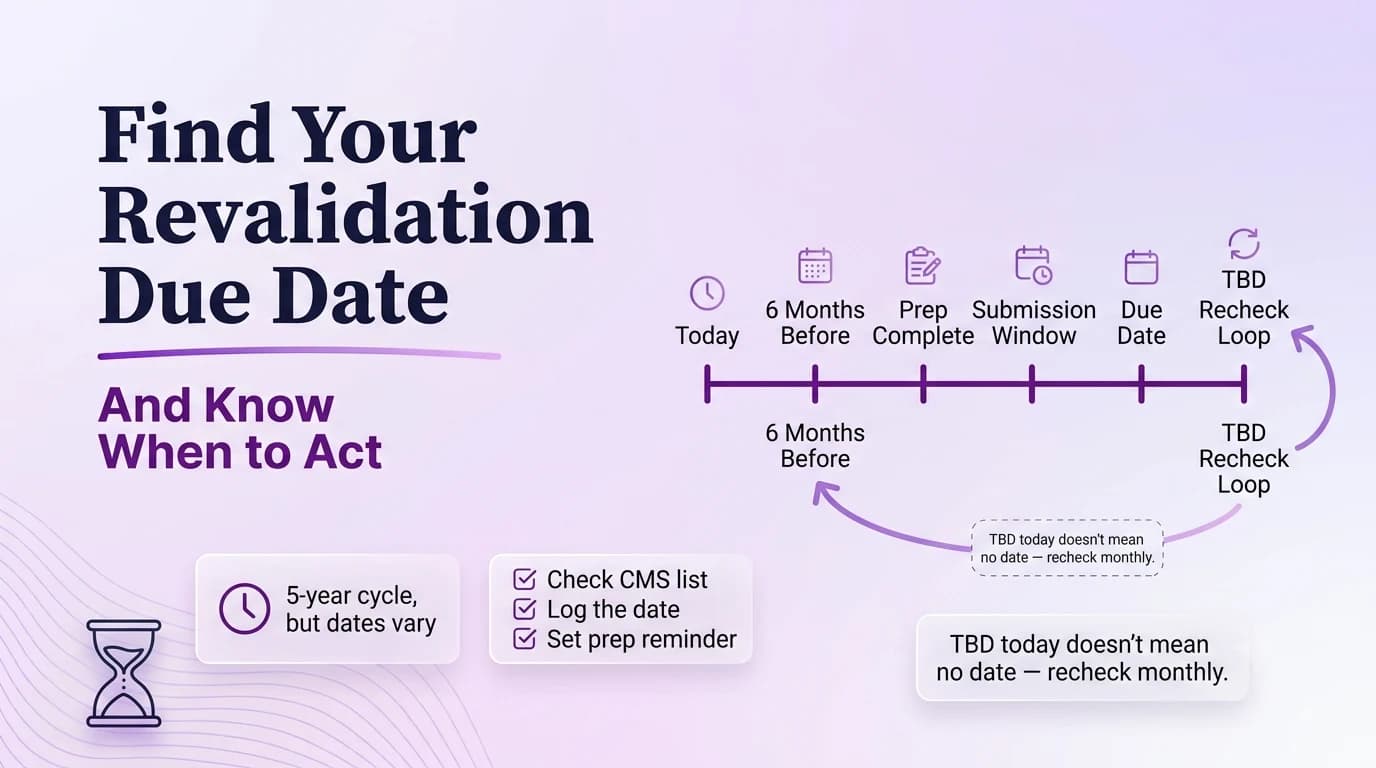
A Medicare revalidation due date should be looked up, not estimated from memory. CMS generally revalidates providers and suppliers every five years, with DMEPOS suppliers on a three-year cycle, and CMS can also request off-cycle revalidation. Those cycle lengths are planning rules; they are not a substitute for the current due date or contractor notice tied to a specific enrollment. The maintenance workflow should record the provider or supplier, NPI/PTAN where applicable, current CMS due-date information, MAC, preparation start date, and correspondence owner. If the due date is not yet posted, track that fact and continue monitoring instead of manufacturing an anniversary based on the last approval.
Look up the current Medicare revalidation information before calculating anything
Most Medicare providers and suppliers revalidate every five years; DMEPOS suppliers generally revalidate every three years.
CMS posts due dates in the Medicare Revalidation List and says due dates are posted seven months in advance.
CMS advises providers to revalidate when they are within three months of the due date even if no notice has arrived.
The record should begin with a current CMS/PECOS check. Store the lookup date and the due date or status displayed for the enrollment. If the practice has multiple NPIs, PTANs, states, or supplier records, confirm that the lookup corresponds to the exact enrollment being calendared. A generic reminder such as “Dr. Patel revalidates in 2028” is not enough for a clinician with more than one Medicare relationship. Link the due-date entry to the enrollment identifier and MAC so later staff can reproduce the lookup.
Use the five-year and three-year cycles as context, not as a homemade due date
CMS says unsolicited revalidations submitted when the due date is more than seven months away may be returned.
Providers are responsible for monitoring the due date even though contractors send notices.
Calendar early; submit on time. Those are different actions, and treating them as the same creates avoidable returned applications.
CMS’s general revalidation frequency is useful for capacity planning: most providers and suppliers are on a five-year cycle, while DMEPOS suppliers are generally on a three-year cycle. CMS also reserves the right to request off-cycle revalidation. That means adding five years to the last approval date can produce a false deadline. Use the cycle to forecast future workload, but let current CMS information and contractor notices control the actual task. When the due date changes, preserve the prior lookup and note the new source instead of silently overwriting the calendar.
Start a source-document audit before the formal deadline is close
Set a preparation date well before the due date. Review legal and tax identity, ownership/control, locations, licenses, banking/EFT, authorized or delegated officials, adverse legal actions, and provider-type-specific supporting documents. Compare the current PECOS record with actual operations rather than assuming routine change reporting kept everything perfect. If a document will expire during the preparation period, obtain the replacement early. The revalidation should be an audit of the live enrollment, not a copy of the last application with a new signature.
Resolve ownership, location, license, and relationship changes before submission
Submitting too early because the team is anxious about expiration. When this happens, correct the source record first and then update the downstream copies that are actually affected.
Waiting for a paper letter when the public due-date tool already shows the date. Do not bury this under a generic “pending” label. Name the blocker, the owner, and the next action.
Treating “TBD” as permission to choose a date. A copied prior application is especially risky here because an old file can be internally consistent and still be wrong for the current facts.
Tracking only the clinician and missing the organization or reassignment records that also need review. The safe response is to stop the handoff until the source evidence and submitted answer tell the same story.
Differences discovered during the audit need ownership. A closed location, ownership change, new managing official, or missed disclosure may have its own reporting implications and should not be hidden inside the revalidation just to make the record match today. Escalate potentially late changes and determine the correct current reporting action. For practitioner groups, review active reassignments and current clinicians. For multi-state operations, verify each jurisdictional record. A revalidation is most valuable when it reconciles the entire enrollment ecosystem, not just the fields the preparer remembers changing.
Monitor the MAC after filing and preserve the exact transaction evidence
Revalidation lookup screenshot: Use a filename that includes the provider or entity, document type, and the date that matters.
Internal calendar entry: Store it with the transaction rather than in a personal downloads folder or one coordinator’s inbox.
Pecos current record: Tie the document to the specific field or decision it supports.
Submission receipt: Record where it came from and when someone verified it.
Mac notice if received: Preserve the prior version when an effective-date sequence could matter in a later review.
After submission, save the confirmation, transaction ID, signed application or PECOS export, attachments, and development responses. Track the MAC disposition separately from the due date so the office knows the revalidation was submitted on time even while it is being processed. If the contractor asks for more information, treat the request as a deadline and respond from the source file. At completion, save the final status/effective information and update billing or other downstream systems only if the revalidation changed relevant enrollment data.
Keep off-cycle requests and future ordinary revalidation dates as separate records
If CMS requests an off-cycle revalidation, create a new transaction row. Do not automatically delete or recalculate the ordinary future due date. Likewise, a recently completed off-cycle review does not give the office license to ignore the next CMS notice. Keep a revalidation history showing request type, due date, submission, MAC result, and source of the next date. That history is more reliable than a recurring calendar event and survives staff turnover because it explains why each review happened.
Operational checklist
- Search the current CMS Revalidation List by the relevant NPI/enrollment.
- Record the displayed due date or TBD status with the lookup date.
- Create an internal preparation date several months ahead without actually submitting too early.
- Reconcile the full enrollment record before opening the revalidation.
- Submit in the proper CMS window and preserve confirmation.
- Recheck monthly until every monitored enrollment has a resolved due date.
Frequently asked questions
Is Medicare revalidation always exactly five years after the last approval?
No. Five years is the general cycle for most providers and suppliers, while DMEPOS is generally three years, and CMS can request off-cycle revalidation. Use current CMS/PECOS due-date information rather than a calculated anniversary.
What if CMS does not show a due date yet?
Record the lookup and continue monitoring. Do not invent a due date from an old approval. Use the general cycle only for forecasting until CMS or the MAC provides the actionable date.
Should revalidation be prepared by copying the previous application?
No. Compare the current Medicare record with current source documents and actual operations. Prior applications are historical references, not the source of truth for today’s ownership, locations, licenses, or relationships.