New Group Practice Medicare Enrollment: Sequence the Entity, Clinicians, and Reassignments
Sequence Medicare enrollment for a new group practice by separating organization identity, Type 2 NPI, CMS-855B/PECOS group enrollment, individual practitioners, reassignments, and billing activation.
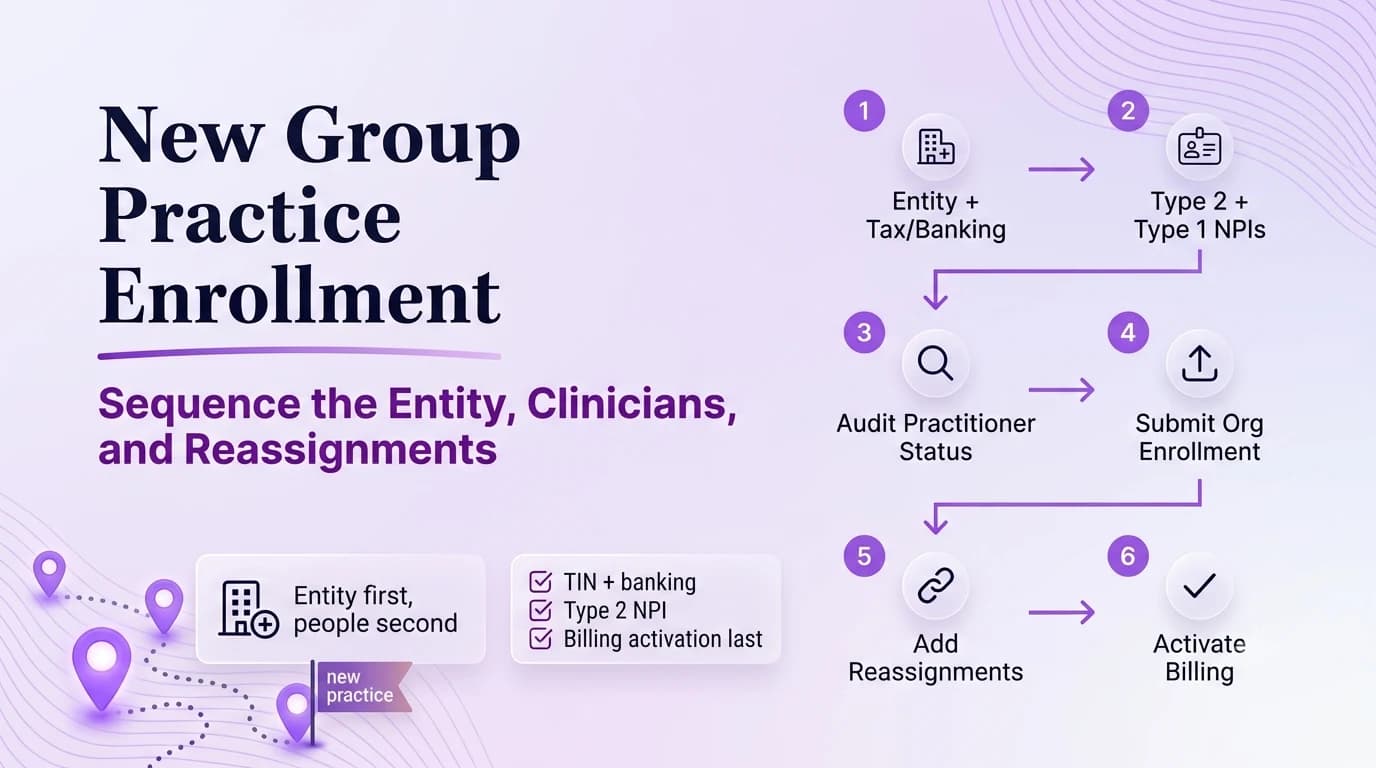
A new Medicare group is not one application. It is an organization record plus the practitioners and relationships that allow claims to flow through that organization. The cleanest sequence begins with the legal entity and payment recipient: exact legal business name, TIN, Type 2 NPI when applicable, ownership/control, locations, and banking. Then establish the group Medicare enrollment, confirm each practitioner’s individual Medicare status, and create the reassignment relationships needed for the group to receive payment. Some of these tasks can be prepared in parallel, but they should not be collapsed into one status. A practice can have an approved CMS-855B record and still be unable to bill for a clinician whose individual enrollment or reassignment is incomplete.
Map the business and payment entity before opening Medicare applications
CMS separates organization enrollment from individual practitioner enrollment.
A group practice uses the clinic/group enrollment path, while physicians and NPPs use individual enrollment.
Reassignment connects eligible practitioner services to the entity that will bill and receive Medicare payment.
Draw the future billing structure with legal entity, TIN, Type 2 NPI, owners, service locations, bank account, and the clinicians who will render services. If the owner is also the first physician or therapist, show the person and organization as separate nodes. Decide which entity signs payer contracts and receives Medicare payment. A group built on an unclear tax or organization structure will carry that ambiguity into NPPES, PECOS, EFT, and commercial plans. Resolve the legal/payment map before enrollment staff start copying names into forms.
Obtain or verify the organization NPI and source identity records
NPPES, PECOS, banking, and tax records should describe the same legal arrangement.
MAC processing and requests can change the operational launch timeline.
Think of launch as three synchronized workstreams—entity, practitioner, payment relationship—rather than one giant “credentialing” task.
Verify the organization’s NPPES record and Type 2 NPI where the structure requires one. The legal business name should align with the organization’s source records and TIN. If a DBA is used publicly, store it separately. Do not create a second organization NPI because one payer portal rejects a name; investigate the mismatch first. The identifier sheet should become the common source for Medicare, commercial payers, clearinghouse setup, and future clinicians. An NPI is an identifier, not approval, so keep enumeration evidence separate from Medicare enrollment status.
Build the CMS-855B or PECOS group enrollment around actual operations
Prepare the group’s CMS-855B/PECOS transaction with ownership/control, locations, authorized officials, EFT, and other organization data. Use the current 2026 form or online workflow. If a location is not yet open, confirm how the contractor wants the future site handled rather than guessing. Save the submitted organization record and track MAC development requests. The group approval creates the organization’s Medicare foundation; it does not enroll the physicians or other eligible practitioners personally.
Audit each clinician’s individual Medicare enrollment independently
Picking a target opening date first and forcing enrollment facts to fit it. This tends to surface later, when billing or scheduling discovers that a supposedly completed file still has an unresolved dependency.
Waiting until the group application is submitted to discover an owner or location record is incomplete. A brief second-person check before submission is usually faster than answering a development request after the fact.
Assuming both clinicians have identical Medicare status because they worked at the same employer. When this happens, correct the source record first and then update the downstream copies that are actually affected.
Not preserving the approvals needed for future audits, payer contracting, or revenue-cycle setup. Do not bury this under a generic “pending” label. Name the blocker, the owner, and the next action.
For each clinician, check whether the person already has a Medicare practitioner enrollment, which state/jurisdiction it covers, what locations are on file, and whether any current updates are needed. A clinician changing employers generally does not need a new NPI and may not need a brand-new Medicare enrollment, but the record must support the new work arrangement. New graduates or newly eligible provider types may need full individual enrollment. Put each clinician on a separate row so one slow file does not obscure the status of the rest of the group.
Establish reassignments and locations that connect the clinicians to the group
Entity formation packet: Tie the document to the specific field or decision it supports.
Npi map: Record where it came from and when someone verified it.
Practitioner status reports: Preserve the prior version when an effective-date sequence could matter in a later review.
Group pecos submission: Keep the current version and enough history to show when it changed.
Reassignment/effective-date roster: Use a filename that includes the provider or entity, document type, and the date that matters.
Establish each practitioner-to-group reassignment using current PECOS/CMS-855I processes and verify required locations. After CMS’s form consolidation, do not build the workflow around a standalone 855R. Record effective dates and preserve other legitimate reassignments. For a group with multiple offices, verify which practitioner/location combinations Medicare recognizes. This relationship layer is what converts an enrolled person and an enrolled organization into the payment path the billing team expects.
Launch billing only from a provider-by-provider effective-date matrix
Create a launch matrix with practitioner, individual enrollment status, group reassignment, locations, effective date, and billing configuration. Give revenue cycle only the rows that are actually ready. If one clinician is pending, the entire practice does not need to stop, but that clinician should not be treated as active through the group. Watch first claims and remittances for enrollment edits and reconcile them against the matrix. Keep the matrix as the starting point for future hires and revalidation rather than rebuilding the group structure from memory.
Operational checklist
- Create the entity and tax/banking records.
- Establish the Type 2 NPI and confirm each clinician’s Type 1 NPI.
- Audit each practitioner’s current Medicare status before filing changes.
- Submit the organization enrollment with complete ownership and location data.
- Add or update clinician enrollment and reassignment relationships.
- Set billing activation only after approvals and effective dates are reconciled with the clearinghouse and practice-management system.
Frequently asked questions
Can a new group submit one Medicare application for the organization and all clinicians?
No single status replaces the separate records. The organization enrollment, each practitioner’s individual enrollment, and the reassignment relationships must all be addressed even when work is prepared in parallel.
Does every clinician need a new NPI when joining the group?
No. An individual Type 1 NPI normally follows the clinician across employers. Verify the existing NPPES and Medicare record and update relationships or locations as needed.
When can the new group begin billing for a specific clinician?
Use the clinician-specific Medicare effective information and confirm the group reassignment and required locations are established. Do not rely on the group approval date alone.
Sources reviewed
Current CMS enrollment sequence, PECOS use, MAC coordination, and change-reporting timeframes.
Current CMS-855 application purposes and PECOS guidance.
CMS-855R is discontinued; reassignment data is now captured on CMS-855I.